

Have a Question?
-
Start Here
-
📟PC Pro-LAN
-
📟 PC SMART
-
🖥️ Radonix CAM-Pro
-
🖥️ CAD:CAM
-
Interfaces
-
Calibration
-
🖥️ CAM-Pro Test
-
Old interface
-
🔧 Support
-
⚙️ Connections
-
- Two DELTA ASDA-B2
- ADTECH QS7
- ALPHA5 Smart
- BONMET SA series
- DELTA ASDA-A
- DELTA ASDA-A2
- DELTA ASDA-B
- DELTA ASDA-B2
- DORNA EPS-B1
- DORNA EPS-B2
- ESTUN EDB
- ESTUN EDC
- ESTUN ETS
- ESTUN PRONET
- Fuji-ALPHA5 Smart series
- HIGEN FDA7000
- Inovance IS620P
- JMC JASD
- JMC JSDA
- Kinco-FD
- Kinco-FD
- Kinco-JD
- Kingservo KSDG
- Kollmorgen
- Leadshine EL5
- Leadshine ES-D808
- LS XDL-S
- Maxsine EP2
- MECAPION APD-VS
- Mitsubishi MR-E
- MITSUBISHI MR-E KH003
- Mitsubishi MR-J2S
- Mitsubishi MR-JE
- NG100H
- Omicron-MK6 series
- OMRON sigma-II
- Panasonic MINAS A4
- Panasonic Minas-LIQI Series
- Panasonic MINAS A5E
- SANMOTION-RS1 Series
- SANYODENKI-Q-S
- SANYU SY200
- SIEMENS-SINAMICS
- Stepper
- TECO JSDA Series
- TECO-JSDE
- TECO SR, TSDA and SD Series
- TECO TSTA Series
- TETA D2
- WEIDE B2 series
- YASKAWA-SGD7S
- YASKAWA-SGDM
- YL-VPV Series
- YUHAI SG-30A
- YUHAI SG-AS
- Show Remaining Articles (40) Collapse Articles
-
- Two DELTA ASDA-B2
- ADTECH QS7
- ALPHA5 Smart
- BONMET SA series
- DELTA ASDA-A
- DELTA ASDA-A2
- DELTA ASDA-B
- DELTA ASDA-B2
- DORNA EPS-B1
- DORNA EPS-B2
- ESTUN EDB
- ESTUN EDC
- ESTUN ETS
- ESTUN PRONET
- Fuji-ALPHA5 Smart series
- HIGEN FDA7000
- Inovance IS620P
- JMC JASD
- JMC JSDA
- Kinco-FD
- Kinco-FD
- Kinco-JD
- Kingservo KSDG
- Kollmorgen
- Leadshine EL5
- Leadshine ES-D808
- LS XDL-S
- Maxsine EP2
- MECAPION APD-VS
- Mitsubishi MR-E
- MITSUBISHI MR-E KH003
- Mitsubishi MR-J2S
- Mitsubishi MR-JE
- NG100H
- Omicron-MK6 series
- OMRON sigma-II
- Panasonic MINAS A4
- Panasonic MINAS A5E
- Panasonic Minas-LIQI Series
- SANMOTION-RS1 Series
- SANYODENKI-Q-S
- SANYU SY200
- SIEMENS-SINAMICS
- Stepper
- TECO JSDA Series
- TECO-JSDE
- TECO SR, TSDA and SD Series
- TECO TSTA Series
- TETA D2
- WEIDE B2 series
- YASKAWA-SGD7S
- YASKAWA-SGD7S
- YL-VPV Series
- YUHAI SG-AS
- Show Remaining Articles (39) Collapse Articles
-
- Two DELTA ASDA-B2
- ADTECH QS7
- ALPHA5 Smart
- BONMET SA series
- DELTA ASDA-A
- DELTA ASDA-A2
- DELTA ASDA-B
- DELTA ASDA-B2
- DORNA EPS-B1
- DORNA EPS-B2
- ESTUN EDB
- ESTUN EDC
- ESTUN ETS
- ESTUN PRONET
- Fuji-ALPHA5 Smart series
- HIGEN FDA7000
- Inovance IS620P
- JMC JASD
- JMC JSDA
- Kinco-FD
- Kinco-FD
- Kinco-JD
- Kingservo KSDG
- Kollmorgen
- Leadshine EL5
- Leadshine ES-D808
- LS XDL-S
- Maxsine EP2
- MECAPION APD-VS
- Mitsubishi MR-E
- MITSUBISHI MR-E KH003
- Mitsubishi MR-J2S
- Mitsubishi MR-JE
- NG100H
- Omicron-MK6 series
- OMRON sigma-II
- Panasonic MINAS A4
- Panasonic MINAS A5E
- Panasonic Minas-LIQI Series
- SANMOTION-RS1 Series
- SANYODENKI-Q-S
- SANYU SY200
- SIEMENS-SINAMICS
- Stepper
- TECO JSDA Series
- TECO-JSDE
- TECO SR, TSDA and SD Series
- TECO TSTA Series
- TETA D2
- WEIDE B2 series
- YASKAWA-SGD7S
- YASKAWA-SGDM
- YL-VPV Series
- YUHAI SG-30A
- YUHAI SG-AS
- Show Remaining Articles (40) Collapse Articles
-
- Two DELTA ASDA-B2
- ADTECH QS7
- ALPHA5 Smart
- BONMET SA series
- DELTA ASDA-A
- DELTA ASDA-A2
- DELTA ASDA-B
- DELTA ASDA-B2
- DORNA EPS-B1
- DORNA EPS-B2
- ESTUN EDB
- ESTUN EDC
- ESTUN ETS
- ESTUN PRONET
- Fuji-ALPHA5 Smart series (COPY)
- HIGEN FDA7000
- Inovance IS620P
- JMC JASD
- JMC JSDA
- Kinco-FD
- Kinco-FD
- Kinco-JD
- Kingservo KSDG
- Kollmorgen
- Leadshine EL5
- Leadshine ES-D808
- LS XDL-S
- Maxsine EP2
- MECAPION APD-VS
- Mitsubishi MR-E
- MITSUBISHI MR-E KH003
- Mitsubishi MR-J2S
- Mitsubishi MR-JE
- NG100H
- Omicron-MK6 series
- OMRON sigma-II
- Panasonic MINAS A4
- Panasonic MINAS A5E
- Panasonic Minas-LIQI Series
- SANMOTION-RS1 Series
- SANYODENKI-Q-S
- SANYU SY200
- SIEMENS-SINAMICS
- Stepper
- TECO JSDA Series
- TECO-JSDE
- TECO SR, TSDA and SD Series
- TECO TSTA Series
- TETA D2
- WEIDE B2 series
- YASKAWA-SGD7S
- YUHAI SG-AS
- YL-VPV Series
- YASKAWA-SGDM
- YUHAI SG-30A
- Show Remaining Articles (40) Collapse Articles
-
< All Topics
Print
Introduction to Visual Effects
Posted
Updated
Byadmin12QX5
Visual Effects Configuration
This section provides a comprehensive explanation of Visual Effects and their features.
To open the Visual Effects window, press the shortcut keys Ctrl + Shift + Alt + F5 simultaneously. This window allows users to enable visual effects in the current interface and select a new theme. Using these themes, users can completely change the appearance of the program and create a new interface with a custom name and title while preserving the original one.
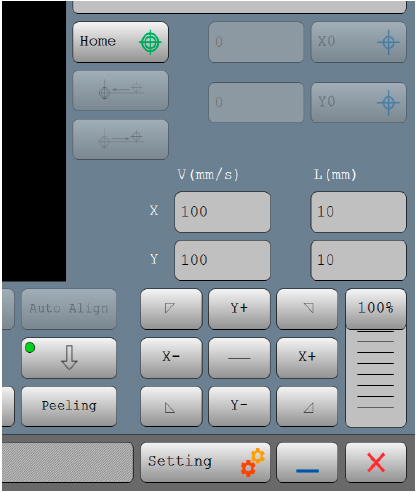
It is also possible to modify how elements appear on the screen—for example:
- Border color,
- Corner roundness of elements,
- Gradient coloring, and
- Whether toggle elements include lighting effects.
(See Figure 28)
Once Ctrl + Shift + Alt + F5 is pressed, the Visual Effects window appears (Figure 29):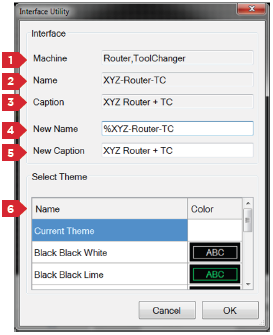
| No. | Description |
|---|---|
| 1 | Displays the type of interface (device type). |
| 2 | The name of the current interface. This shows the filename under which the interface is saved. |
| 3 | The title of the current interface, shown in the interface selection screen when multiple interfaces exist. |
| 4 | This field defines the name of the new interface. |
| 5 | This field defines the title of the new interface. |
| 6 | A list of predefined themes is available here. If you do not want to change the interface theme, select the Current Theme option. |
Table of Contents