-
Start Here
-
📟PC Pro-LAN
-
📟 PC SMART
-
🖥️ Radonix CAM-Pro
-
🖥️ CAD:CAM
-
Interfaces
-
Calibration
-
🖥️ CAM-Pro Test
-
Old interface
-
🔧 Support
-
⚙️ Connections
-
- Two DELTA ASDA-B2
- ADTECH QS7
- ALPHA5 Smart
- BONMET SA series
- DELTA ASDA-A
- DELTA ASDA-A2
- DELTA ASDA-B
- DELTA ASDA-B2
- DORNA EPS-B1
- DORNA EPS-B2
- ESTUN EDB
- ESTUN EDC
- ESTUN ETS
- ESTUN PRONET
- Fuji-ALPHA5 Smart series
- HIGEN FDA7000
- Inovance IS620P
- JMC JASD
- JMC JSDA
- Kinco-FD
- Kinco-FD
- Kinco-JD
- Kingservo KSDG
- Kollmorgen
- Leadshine EL5
- Leadshine ES-D808
- LS XDL-S
- Maxsine EP2
- MECAPION APD-VS
- Mitsubishi MR-E
- MITSUBISHI MR-E KH003
- Mitsubishi MR-J2S
- Mitsubishi MR-JE
- NG100H
- Omicron-MK6 series
- OMRON sigma-II
- Panasonic MINAS A4
- Panasonic Minas-LIQI Series
- Panasonic MINAS A5E
- SANMOTION-RS1 Series
- SANYODENKI-Q-S
- SANYU SY200
- SIEMENS-SINAMICS
- Stepper
- TECO JSDA Series
- TECO-JSDE
- TECO SR, TSDA and SD Series
- TECO TSTA Series
- TETA D2
- WEIDE B2 series
- YASKAWA-SGD7S
- YASKAWA-SGDM
- YL-VPV Series
- YUHAI SG-30A
- YUHAI SG-AS
- Show Remaining Articles (40) Collapse Articles
-
- Two DELTA ASDA-B2
- ADTECH QS7
- ALPHA5 Smart
- BONMET SA series
- DELTA ASDA-A
- DELTA ASDA-A2
- DELTA ASDA-B
- DELTA ASDA-B2
- DORNA EPS-B1
- DORNA EPS-B2
- ESTUN EDB
- ESTUN EDC
- ESTUN ETS
- ESTUN PRONET
- Fuji-ALPHA5 Smart series
- HIGEN FDA7000
- Inovance IS620P
- JMC JASD
- JMC JSDA
- Kinco-FD
- Kinco-FD
- Kinco-JD
- Kingservo KSDG
- Kollmorgen
- Leadshine EL5
- Leadshine ES-D808
- LS XDL-S
- Maxsine EP2
- MECAPION APD-VS
- Mitsubishi MR-E
- MITSUBISHI MR-E KH003
- Mitsubishi MR-J2S
- Mitsubishi MR-JE
- NG100H
- Omicron-MK6 series
- OMRON sigma-II
- Panasonic MINAS A4
- Panasonic MINAS A5E
- Panasonic Minas-LIQI Series
- SANMOTION-RS1 Series
- SANYODENKI-Q-S
- SANYU SY200
- SIEMENS-SINAMICS
- Stepper
- TECO JSDA Series
- TECO-JSDE
- TECO SR, TSDA and SD Series
- TECO TSTA Series
- TETA D2
- WEIDE B2 series
- YASKAWA-SGD7S
- YASKAWA-SGD7S
- YL-VPV Series
- YUHAI SG-AS
- Show Remaining Articles (39) Collapse Articles
-
- Two DELTA ASDA-B2
- ADTECH QS7
- ALPHA5 Smart
- BONMET SA series
- DELTA ASDA-A
- DELTA ASDA-A2
- DELTA ASDA-B
- DELTA ASDA-B2
- DORNA EPS-B1
- DORNA EPS-B2
- ESTUN EDB
- ESTUN EDC
- ESTUN ETS
- ESTUN PRONET
- Fuji-ALPHA5 Smart series
- HIGEN FDA7000
- Inovance IS620P
- JMC JASD
- JMC JSDA
- Kinco-FD
- Kinco-FD
- Kinco-JD
- Kingservo KSDG
- Kollmorgen
- Leadshine EL5
- Leadshine ES-D808
- LS XDL-S
- Maxsine EP2
- MECAPION APD-VS
- Mitsubishi MR-E
- MITSUBISHI MR-E KH003
- Mitsubishi MR-J2S
- Mitsubishi MR-JE
- NG100H
- Omicron-MK6 series
- OMRON sigma-II
- Panasonic MINAS A4
- Panasonic MINAS A5E
- Panasonic Minas-LIQI Series
- SANMOTION-RS1 Series
- SANYODENKI-Q-S
- SANYU SY200
- SIEMENS-SINAMICS
- Stepper
- TECO JSDA Series
- TECO-JSDE
- TECO SR, TSDA and SD Series
- TECO TSTA Series
- TETA D2
- WEIDE B2 series
- YASKAWA-SGD7S
- YASKAWA-SGDM
- YL-VPV Series
- YUHAI SG-30A
- YUHAI SG-AS
- Show Remaining Articles (40) Collapse Articles
-
- Two DELTA ASDA-B2
- ADTECH QS7
- ALPHA5 Smart
- BONMET SA series
- DELTA ASDA-A
- DELTA ASDA-A2
- DELTA ASDA-B
- DELTA ASDA-B2
- DORNA EPS-B1
- DORNA EPS-B2
- ESTUN EDB
- ESTUN EDC
- ESTUN ETS
- ESTUN PRONET
- Fuji-ALPHA5 Smart series (COPY)
- HIGEN FDA7000
- Inovance IS620P
- JMC JASD
- JMC JSDA
- Kinco-FD
- Kinco-FD
- Kinco-JD
- Kingservo KSDG
- Kollmorgen
- Leadshine EL5
- Leadshine ES-D808
- LS XDL-S
- Maxsine EP2
- MECAPION APD-VS
- Mitsubishi MR-E
- MITSUBISHI MR-E KH003
- Mitsubishi MR-J2S
- Mitsubishi MR-JE
- NG100H
- Omicron-MK6 series
- OMRON sigma-II
- Panasonic MINAS A4
- Panasonic MINAS A5E
- Panasonic Minas-LIQI Series
- SANMOTION-RS1 Series
- SANYODENKI-Q-S
- SANYU SY200
- SIEMENS-SINAMICS
- Stepper
- TECO JSDA Series
- TECO-JSDE
- TECO SR, TSDA and SD Series
- TECO TSTA Series
- TETA D2
- WEIDE B2 series
- YASKAWA-SGD7S
- YUHAI SG-AS
- YL-VPV Series
- YASKAWA-SGDM
- YUHAI SG-30A
- Show Remaining Articles (40) Collapse Articles
-
General Introduction to Interfaces
Once the software and the appropriate interface are installed, you can now begin using the Radonix software. This section provides an overview of all elements used within the software.
First, double-click the Radonix file. As shown in Figure 6, you will see a list of all installed interfaces.
If multiple interfaces are installed on the computer, right-clicking on any interface opens a menu. From this menu, you can enable, disable, or completely uninstall an interface.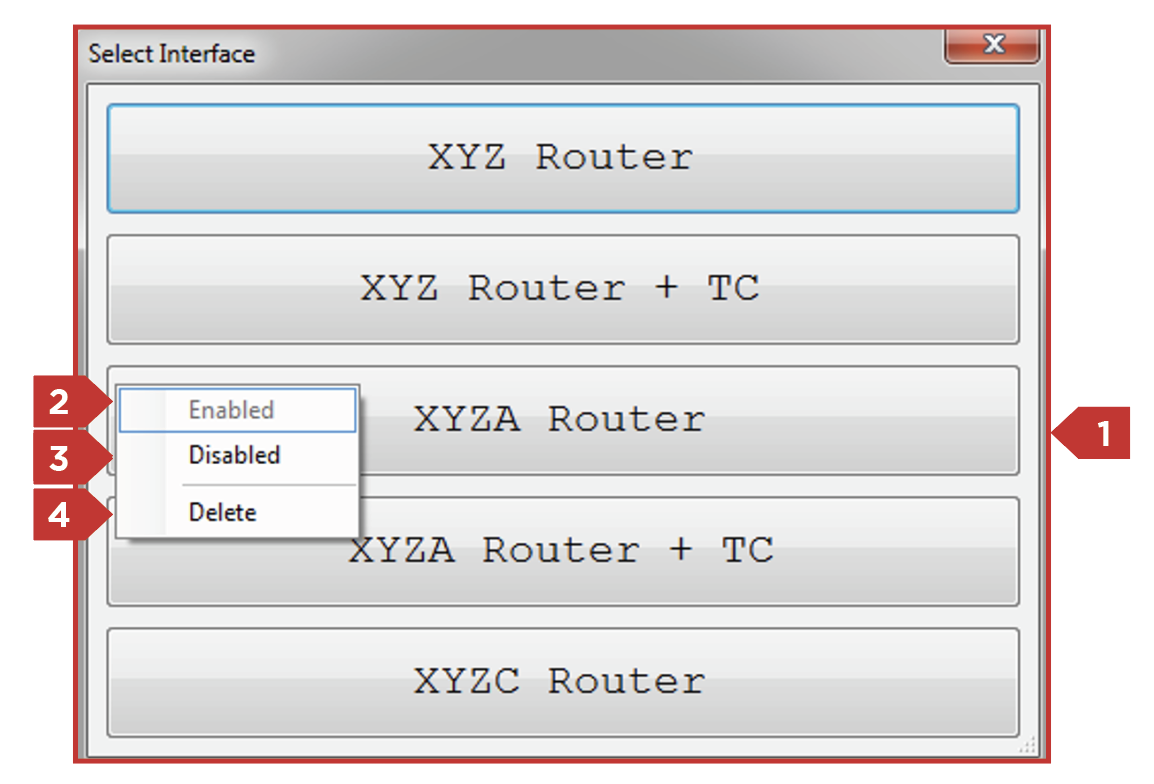
Options available in the interface control menu:
- Active Interfaces
- Reactivate Interface
- Disable Interface (the title of the interface will appear dimmed)
- Completely Remove Interface from the Computer
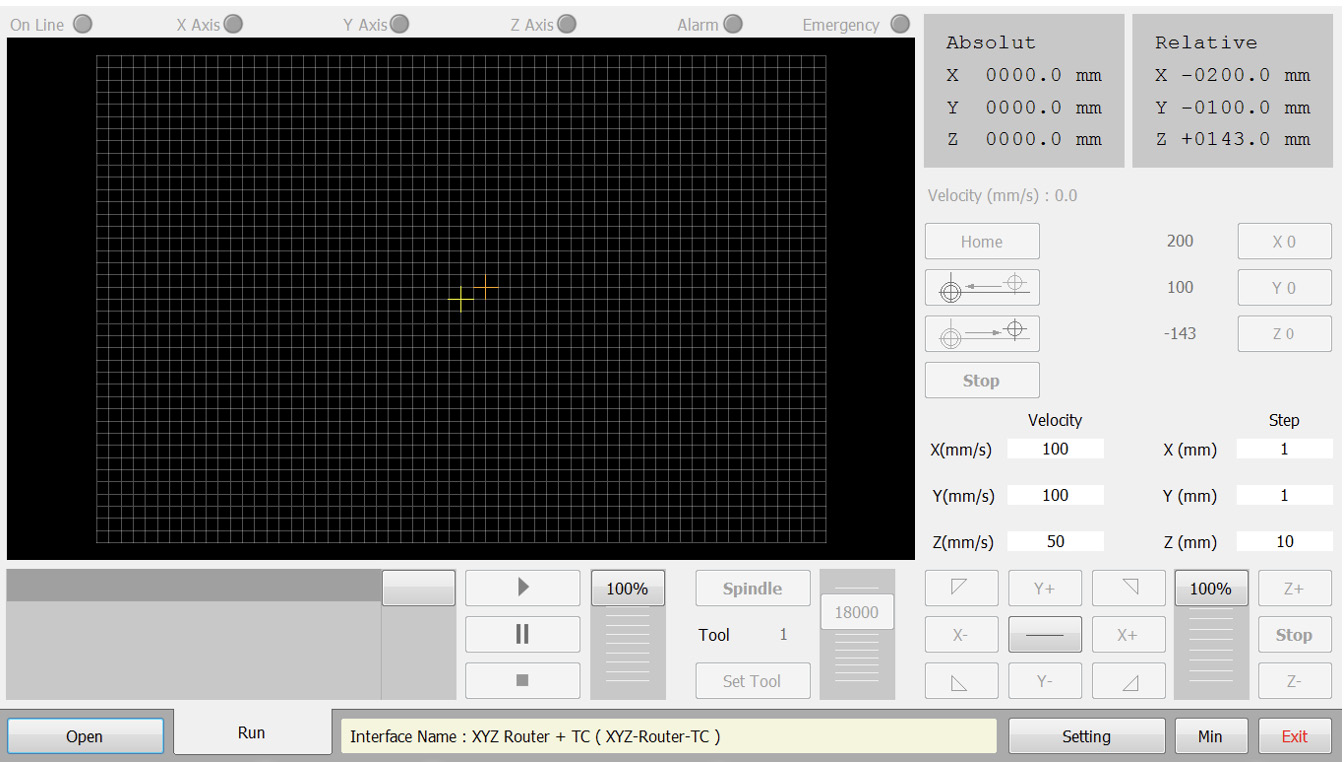
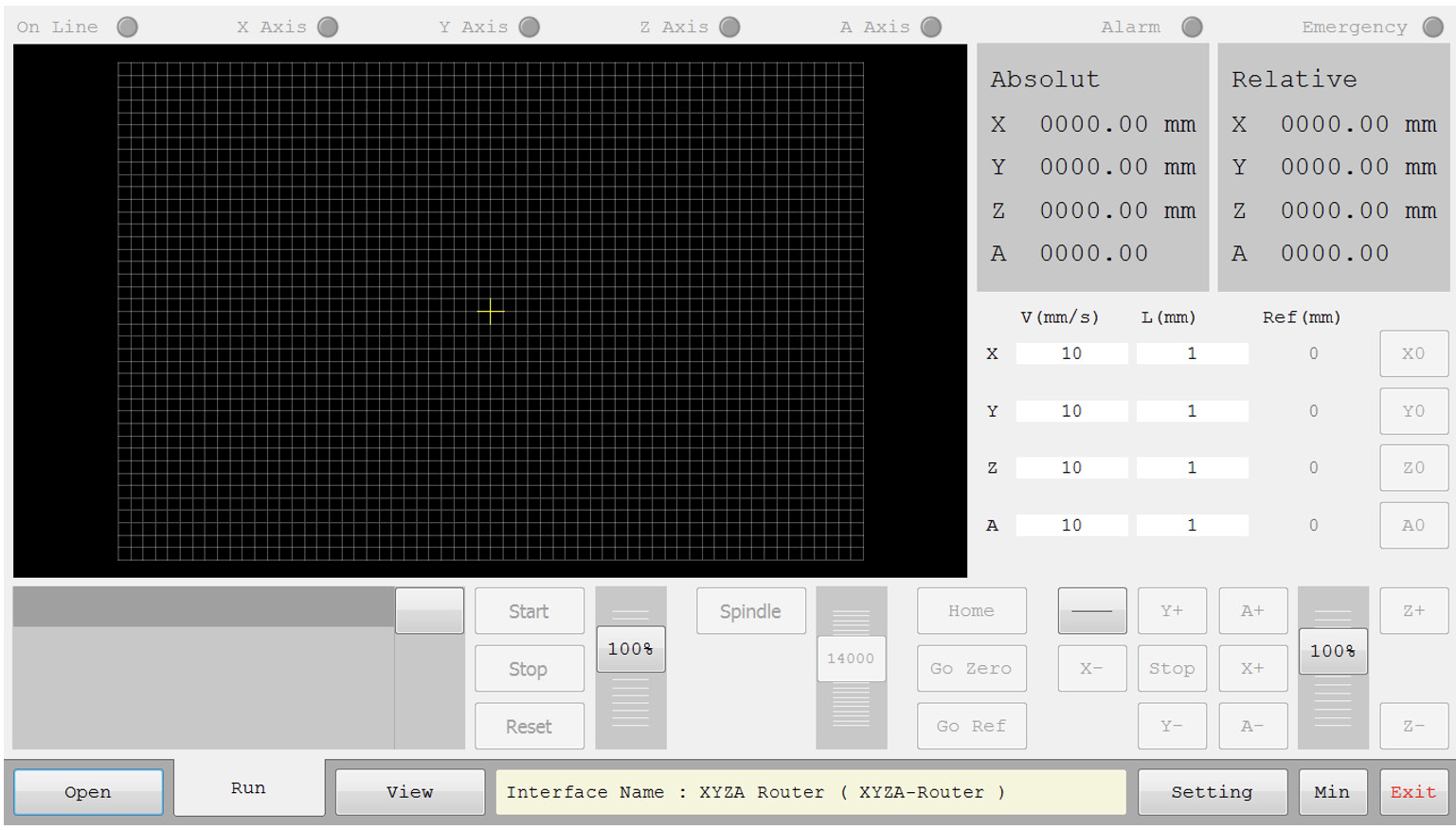
By left-clicking on any interface, it will open within the software. Figures 7 and 8 show examples of two different interfaces. Each one includes different icons depending on its features.
For instance:
- In Figure 7, the interface includes X, Y, and Z axes along with a tool change capability.
- In Figure 8, the interface includes X, Y, Z, and A axes, but does not support tool change. Only the A-axis control icons are present, and the tool change section has been removed from this interface.
This allows users to clearly see the differences between various interface capabilities.